Architecture: the RaspiDR voice assistant
A speaker built on a Raspberry Pi Zero 2 W listens for «хэй пидор» ("hey peedor"), greets you, records the question, transcribes it with cloud STT, hands it to the Hermes LLM agent and speaks the answer chunk by chunk while it is still being generated. Each stage is shown by its own animation on the NeoPixel ring. The encoder sets the volume and switches the wake word off and on; a separate knob service owns it. Hardware: hardware.md; wake word training: wakeword_training.md.
Components
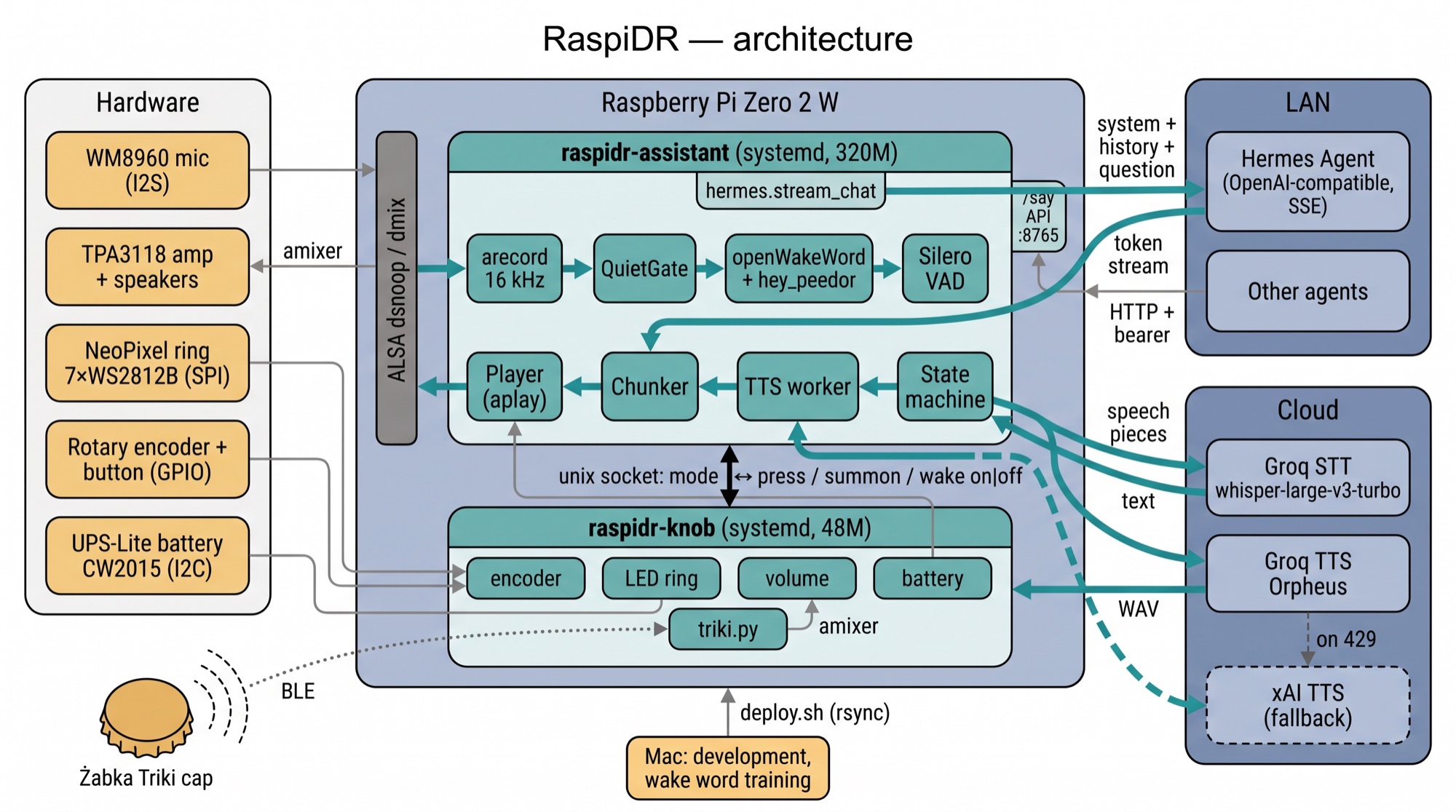
 ┌──────────── Pi Zero 2 W  ($PI_HOST) ─────────────────────────┐        ┌─ LAN ────────────────────────────┐
 │ WM8960 mic ─ arecord 16 kHz ─┐                               │        │ Hermes Agent (Nous Research)     │
 │                              ▼                               │  HTTP  │ $HERMES_API_URL                  │
 │   openWakeWord features (tflite) → hey_peedor.npz (numpy)    │ ─────► │ OpenAI-compatible, SSE stream    │
 │   Silero VAD (onnxruntime) — end of utterance                │        └──────────────────────────────────┘
 │   src/assistant.py — state machine                           │        ┌─ cloud ──────────────────────────┐
 │   Player / LoopPlayer ─ aplay (dmix) ─ TPA3118 speakers      │ HTTPS  │ Groq: STT whisper-large-v3-turbo │
 │   ↕ unix socket (ring modes / press, wake on|off)            │ ─────► │       TTS orpheus-v1 (troy)      │
 │   src/knob.py — encoder (pigpiod), leds.Ring (SPI), amixer   │        │ xAI:  TTS (fallback, leo)        │
 │     └ src/triki.py — Triki BLE token (bleak → BlueZ)  ◄ BLE ─┼─ Żabka Triki cap (wireless knob)       │
 └──────────────────────────────────────────────────────────────┘        │                                  │
 Mac (development): code, wake word training, deploy.sh → rsync          └──────────────────────────────────┘
Voice loop
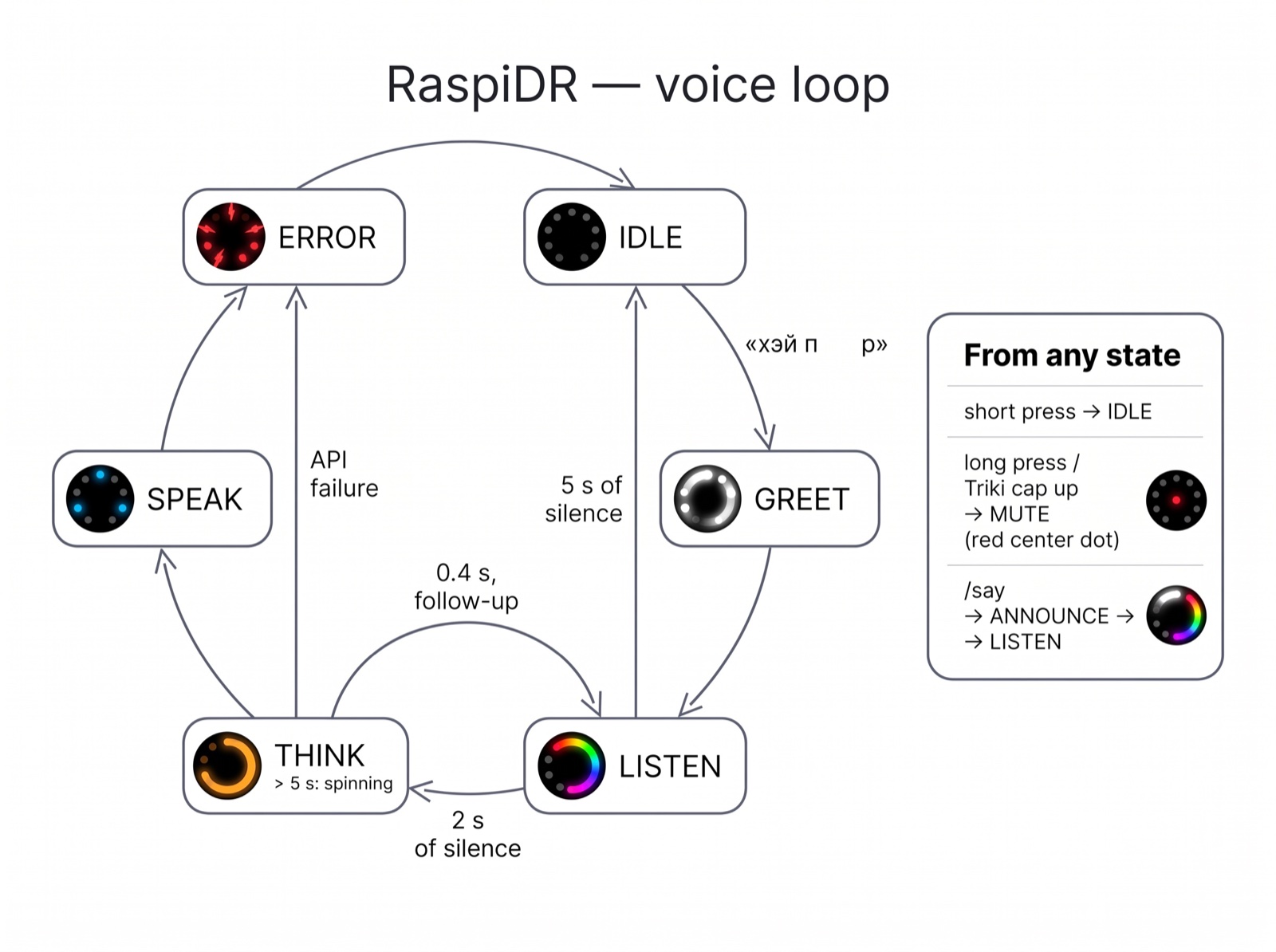
The "0.4 s, follow-up" arrow starts at SPEAK, not THINK: the follow-up listening begins 0.4 s after the answer. The table and transitions below are authoritative.
| State | What happens | Ring (center off — it's the knob's mute dot; brightness 0.06) | Sound |
|---|---|---|---|
| IDLE | waiting for the wake word (score ≥ 0.5 for two consecutive frames); the models only run on sound (see below) | off | — |
| GREET | greeting; the microphone is not listened to | fast white comet | sounds/greetings/*.wav (random, never the same one twice in a row) |
| LISTEN | recording the utterance in pieces: Silero VAD, a 0.7 s pause sends a piece to STT while listening goes on, the phrase ends after 2 s without speech, max 30 s, 0.3 s of pre-roll | rainbow comet | — |
| THINK | Groq STT → Hermes (streaming) | amber breathing | after 1 s, looping "drops" (sounds/think/drops.wav) |
| THINK (long) | Hermes > 5 s (accessing memory/tools) | spinning amber light | once «Секунду, смотрю…» ("One sec, looking…") (sounds/wait/), then drops again |
| SPEAK | queue of TTS chunks | two blue dots moving toward each other | the answer |
| ERROR | API failure | three red flashes | — |
Transitions: IDLE → GREET → LISTEN → THINK → SPEAK → (0.4 s) LISTEN "conversation follow-up" → no utterance for 5 s → IDLE. After the greeting we also wait 5 s for an utterance. A short press of the encoder button (Enter on the Mac) while anything is going on: stops sound, cancels the request, returns to IDLE. In IDLE a short press starts LISTEN right away, like the wake word but without the greeting. After any answer the wake word is ignored for another 1.5 s (model window ~1.3 s; the speaker hears itself).
MUTE: a long press switches the wake word off — the assistant interrupts whatever it was doing and closes the microphone (arecord exits, nothing is recorded) until the next long press. See Encoder.
/say API: speech on request
Other agents can make the speaker say something: src/api.py, a stdlib HTTP server inside the assistant process.
curl -H "Authorization: Bearer $RASPIDR_API_TOKEN" --data-binary 'Привет от агента' http://$PI_HOST:8765/say
curl -H "Authorization: Bearer $RASPIDR_API_TOKEN" -H 'Content-Type: application/json' \
     -d '{"text": "Привет от агента"}' http://$PI_HOST:8765/say
# → 200 {"ok": true, "chunks": 1}- Auth:
Authorization: Bearer <RASPIDR_API_TOKEN>(from.env); without a token in.envthe API is off. PortRASPIDR_API_PORT(8765), all interfaces, plain HTTP — keep it inside the LAN. - The text (up to 2000 characters) is cleaned and split like an answer (
Chunker) and synthesized the same way (Groq, on any error xAI). The response comes once all chunks are synthesized; playback starts with the first one. - It plays when the speaker is free: a dialog in progress (including the follow-up listening) is not interrupted. State ANNOUNCE, "speak" animation on the ring; the wake word is ignored for
--mute-afterafterwards. A short press cuts it off. With the wake word switched off it still speaks — only the microphone is off. - Afterwards, as after an answer, it listens for a reply for
--followup-timeout(5 s) without the wake word, and the spoken text goes into the dialog history as an assistant message — so a reply like «перенеси на четыре» reaches Hermes with its context.--no-followupturns the listening off. - Errors: 400 no text / too long / bad JSON, 401 wrong token, 404 / 405, 413 body over 16 KB, 502 TTS failed.
Encoder: knob service
src/knob.py is a separate process that owns the encoder, the ring, the volume and the UPS battery. Volume and the ring keep working while the assistant restarts or is down; the assistant reconnects on its own and resends its ring mode.
| Action | What happens | Ring | Sound (sounds/knob/) |
|---|---|---|---|
| turn | Speaker 94..127 in 24 steps (~1.4 dB, one per detent) | level bar green → yellow, 4 steps per LED, holds 1.5 s; the edge LED blinks at the limit | tick_up / tick_down, bump at the limit; none while the speaker is talking |
| long press (0.8 s, fires while held) | wake word + microphone off | warm red ring goes out LED by LED backwards, then a dim red center dot while off | wake_off: two notes down |
| long press again | back on | cool white LEDs light up one by one forward and fade | wake_on: two notes up |
| short press | assistant busy — interrupt; idle — start listening without the wake word | (the assistant's own animations) | — |
| double click (within 0.4 s) | shows the battery charge; the first click still goes out as a press right away, the second as double, which drops the listening the first one started | charge bar red (empty) → green (full), holds 2.5 s | battery: one soft note |
| battery below 15%, not charging | stays until above 18% or the charger is plugged in | steady amber LED 0 on top of everything | battery_low: two low notes, once |
cell below 3.55 V on battery, SHUTDOWN_READS reads in a row, one per BATTERY_POLL_S | clean sudo systemctl poweroff; the gauge's % is not trusted near empty (on 2026-09-27 it showed 0% an hour before the cell hit 2.83 V and the Pi died without a shutdown; 3.55 V leaves ~1 h in the cell) | the ring drains amber over and over | battery_low, then power_off |
| charger plugged in / out (GPIO4) | — | green fills the ring from LED 0 both ways / a full amber ring drains back | power_on / power_off: three notes up / down |
The battery is read from the UPS-Lite CW2015 gauge (I2C 0x62) every BATTERY_POLL_S seconds (src/knob.py); charger changes come from the power-good GPIO4 right away. If the gauge doesn't answer (pogo pins), the log says so once and the double click just knocks (bump). Feedback is drawn as a Ring.overlay on top of whatever mode the assistant set. The on/off state survives restarts (~/.config/raspidr/knob.json); the volume stays in the ALSA mixer. Sounds are generated by tools/make_sounds.py knob.
Protocol — unix socket KNOB_SOCKET (default /tmp/raspidr-knob.sock), one text line per message:
assistant → knob:  mode off|greet|listen|think|think_long|speak|error
knob → assistant:  wake on | wake off   (right after connecting and on every toggle)
                   press                (short press)
                   double               (second click of a double click)
                   summon               (Triki button: busy — interrupt, idle — greeting + listening)
                   battery 73|unknown charger|battery
                                        (right after connecting and whenever the rounded % or the power source changes)
When the assistant disconnects, the ring goes to off. assistant.py --leds pi drives the ring and the button directly (no knob service); wakeword.py and tools/hwtest.py also drive the ring directly, so stop the knob before running them.
Triki token: a wireless knob
The knob service also runs src/triki.py in its own thread: a BLE client (bleak → BlueZ) for the Żabka Triki bottle cap (nRF52810 + LSM6DSL). Protocol and radio details are in hardware.md.
| Action | What happens |
|---|---|
| button, token asleep | it wakes and advertises; caught within ~1 s → summon: greeting + listening (or interrupt, if busy); connect, IMU stream 26 Hz |
| button, connected | summon again — the second press cancels the listening the first one started |
| cap up / PCB up (held still 0.4 s) | microphone off / on — the same as the encoder's long press, with its sound and ring |
| turn it lying flat | volume, one step per 15°, clockwise seen from above = louder (either face up) |
| 1 min without motion or presses | disconnect, tick_down |
The token has no sleep command: it sleeps on its own ~180 s after a disconnect or after its button was last pressed, never while connected, and a press while it's still advertising only restarts that timer — nothing on air tells it apart. So after the idle disconnect the service waits ("cooling"): gone from the air → asleep, the next sighting is a press. Still on air 190 s after the disconnect → the button was pressed meanwhile → reconnect quietly (tick_up + the volume bar, no greeting — it would come minutes late). The encoder turned or pressed while the token is still awake → someone is at the speaker → take it back quietly right away; the encoder in use also keeps a connected token from the idle disconnect. A lost link (out of range) reconnects quietly too. Scanning runs 0.2 s every second. TRIKI_NAME in .env is the advertised name prefix (default Triki, empty — off). tools/triki_probe.py explores the token by hand: --watch (air only), a streaming session, --cmd <hex>.
Wake word CPU
openWakeWord costs ~27 ms of CPU per 80 ms frame on the Pi (embedding model 21 ms, melspectrogram 4 ms, our MLP 2 ms), so the assistant saves it where it can:
wakeword.fast_features— the stockAudioFeatureskeeps 10 s of raw audio and copies all of it into a Python list on every frame (16 ms per frame); a buffer of one frame + 480 samples gives the same features.wakeword.QuietGate— in IDLE the models only run on sound at least--gate-db 8dB above the adaptive noise floor, plus 1 s of pre-roll before it and 1.5 s after. The level is measured in the 300–4000 Hz speech band, so low-frequency noise doesn't mask quiet phrases (see power efficiency).- Outside IDLE the models don't run at all; back in IDLE a score is computed only after 24 fresh frames, so the features that still hold the wake phrase can't fire it again.
- Every 5 minutes the log says how much of the waiting time the models ran and the noise floor (
[GATE] …).
Measured with people in the room: assistant 53% → 34% of a core, whole system 17% → 12% of 4 cores; in silence the models don't run. Also running: arecord ~8% (48 → 16 kHz resampling in ALSA), pigpiod ~4.5%, knob.py ~2%.
Response pipeline
utterance (PCM) → voice.stt(language auto-detected, prompt «хэй пидор») → clean_stt (strips «…», «—», Whisper subtitle credits)
  → hermes.stream_chat(system prompt + date/time + battery, history, question)
  → Chunker: first sentence immediately, then merged up to ~100–180 chars, long ones split at a comma
  → TTS worker: Groq Orpheus, single attempt; 429/error → straight to xAI (leo, language guessed from the chunk)
→ Player (WAV queue, aplay one at a time)- System prompt (
assistant.system_prompt(), built for every request): answer in the language of the question (usually Russian, English or Polish), 1–3 sentences, no markdown/lists/emoji; plus the current date, weekday and time of the Pi's timezone, and the battery charge and power source from the knob service (the gauge is polled everyBATTERY_POLL_Ss; "unknown" when it doesn't answer, while the charger pin is always known; mentioned only when asked). - Languages: Whisper detects the language itself (no
languageparameter). For xAI TTS the language of each chunk is guessed from its letters: Cyrillic —ru, Polish diacritics —pl, other Latin —en. - History: last 3 question–answer pairs; 5 minutes of silence resets it.
- The first sentence is sent to TTS separately so that audio starts as early as possible.
Modules (src/)
| File | What it does |
|---|---|
assistant.py | main process: state machine, STT → Hermes → TTS pipeline, stage log with timings |
wakeword.py | NpzModel (custom numpy model), resolve_model, Greeter; run on its own, a detector without the assistant (--test, --wav) |
knob.py | knob service: encoder → volume / wake word on-off / interrupt / battery bar, owns the ring, UPS battery (CW2015 + GPIO4), unix socket for the assistant |
triki.py | Triki BLE token client (runs inside the knob): scan / connect / IMU stream → gestures (summon, flip, turn) |
leds.py | Ring: modes off/greet/listen/think/think_long/speak/error, 25 FPS animation thread, overlays for the knob feedback; backends pi / console (Mac) / off |
audio_io.py | Mic (arecord / ffmpeg avfoundation on the Mac), Player (queue), LoopPlayer (looping background) |
api.py | /say HTTP API for other agents (bearer token), runs inside the assistant |
controls.py | KnobLink — the assistant's side of the knob socket (acts as its ring and button); InterruptButton — GPIO23 directly / Enter on the Mac |
hermes.py | streaming Hermes client (stdlib, SSE) |
voice.py | Groq/xAI STT and TTS, api_key() (environment or .env in the root); written by a separate session |
tools/hwtest.py | checks all hardware (I2C, UPS, ring, encoder, speakers, microphones) |
tools/micmeter.py, tools/micprobe.py | microphone levels on the ring; "which mic goes to which channel" |
tools/record_samples.py | records phrase samples, prompted by the ring → recordings/ |
tools/make_sounds.py | procedural sounds (waiting drops, knob feedback) |
tools/triki_probe.py | Triki token by hand: air watch (--watch, scan duty --on/--off), a streaming session with gestures, raw RX commands (--cmd) |
tools/powerlog.py | power draw from the battery: logs charge / volts / charger / CPU to a CSV, report turns stretches on battery into watts (≈, the gauge has no current sensor) |
Threads in assistant.py: main (reads the microphone in 80 ms frames, never blocks), response (STT + Hermes), TTS worker, player, background player, knob socket. In knob.py: main (button polling 50 Hz, volume), ring animation, encoder callbacks (pigpio), socket accept + one reader per client, Triki (asyncio loop; hands events to main via a queue).
Audio on the Pi
- ALSA
default= asym: capture viadsnoop, playback viadmix(/etc/wm8960-soundcard/asound.conf), so the microphone and several players work simultaneously. The card runs at 48 kHz;pcm.captureconverts to 16 kHz withrate_converter "linear"(~1% CPU instead of ~13% with the globalsamplerate, see power efficiency). - PulseAudio (socket-activated user service) grabs the card →
Device or resource busy, a volume reset, and a microphone that records pure zeros. It starts on every ssh login, soraspidr.sh installmasks it for the user (note in~/PULSEAUDIO_DISABLED.txt,raspidr.sh uninstallunmasks).assistant.pyalso stops it on startup (--keep-pulseaudioleaves it alone). - The mixer is saved in
/etc/wm8960-soundcard/wm8960_asound.state:Speaker127,Speaker AC/DC5,DATSEL=1(the only working microphone is recorded to both channels). The knob changesSpeakerat runtime. - WAVs from Groq/xAI and the greetings are written as a "stream", with a garbage length in the header; duration is computed from the file size.
Configuration
.env in the project root — copy .env.example, every variable is explained there. It is gitignored and shipped to the Pi by deploy.sh (mode 600): PI_HOST, PI_DIR (deploy target), HERMES_API_URL, HERMES_API_KEY, HERMES_MODEL, GROQ_API_KEY, XAI_API_KEY (also used by the training scripts), RASPIDR_API_TOKEN, RASPIDR_API_PORT (the /say API), TRIKI_NAME (the Triki token). No hosts or addresses are hardcoded anywhere else.
Main src/assistant.py flags: --text "вопрос" (question text, no microphone), --no-wake, --leds knob|pi|console|off (Pi default knob), --gate-db 8 (0 — wake word models on every frame), --threshold, --listen-timeout 5, --followup-timeout 5, --no-followup, --end-silence 0.9, --long-think 5, --think-sound-delay 1, --think-sound "" (no drops), --xai-voice leo, --mic-device.
Development and deployment
# Mac: test without a microphone (sound via afplay, ring in the terminal)
.venv/bin/python src/assistant.py --text "Привет, кто ты?"
.venv/bin/python src/assistant.py --no-wake          # Mac microphone via ffmpeg

./deploy.sh              # rsync to $PI_HOST:~/$PI_DIR (without .git, .venv*, training, hey-peedor, recordings)
./deploy.sh --install    # + raspidr.sh install on the Pi
./deploy.sh --restart    # + raspidr.sh restart
./deploy.sh --logs       # follow the journal of both services
On the Pi both processes run as systemd units, raspidr-knob and raspidr-assistant (User= the deploying user, Restart=always, started at boot after pigpiod and wm8960-soundcard). A third unit, raspidr-wifi-guard (root, runs once per boot), reloads the Wi-Fi driver or reboots when the chip's firmware failed to load and wlan0 never appeared (see hardware). raspidr.sh in the project root manages them and is shipped with the code:
./raspidr.sh install     # .venv + requirements, write /etc/systemd/system/raspidr-*.service, enable and start
./raspidr.sh uninstall   # stop, disable, remove the units (.venv and ~/.config/raspidr stay)
./raspidr.sh start | stop | restart | status
./raspidr.sh logs [-f]   # journalctl -u raspidr-knob -u raspidr-assistant
./raspidr.sh journal     # only the journal settings (also part of install)
Memory limits: MemoryMax=320M for the assistant and 48M for the knob, so a runaway process is reclaimed or killed inside its unit instead of dragging the whole Pi into swap (once this hung the Pi: Wi-Fi dropped, only a power cycle helped). The Raspberry Pi firmware disables the memory cgroup (cgroup_disable=memory), so install appends cgroup_enable=memory to /boot/firmware/cmdline.txt (backup cmdline.txt.bak); it takes effect after a reboot.
The journal is kept on disk (/etc/systemd/journald.conf.d/raspidr.conf overrides Raspberry Pi OS's Storage=volatile): at most 1 month (MaxRetentionSec, weekly files) and 64 MB, so the logs survive a hang and a power cycle.
Caution when killing by hand: pkill -f "…assistant.py" in the same ssh command as other mentions of assistant.py kills the ssh session itself, because the pattern matches its command line. raspidr.sh uses [a]ssistant / [k]nob when it stops copies started outside systemd.
Measurements (2026-09-26)
| What | Value |
|---|---|
| Waiting for the wake word: assistant CPU / arecord / whole system | 59% of a core / 8% of a core / 18% of 4 cores |
| Assistant memory (RSS) | 204 MB of 416 (~144 free); 163 MB after a restart. Knob service: ~8 MB |
| Groq STT for a 2–3 s utterance | 0.7–0.8 s |
| Hermes: first token | 1.7–1.8 s (simple question), up to 61 s (accessing memory) |
| Groq TTS per chunk | 0.7–1.5 s (long chunk up to 3 s) |
| From end of utterance to the first sound of the answer | ~3–4 s for a simple question |
Known issues and next steps
- Groq TTS free tier: 10 requests/min; when the limit is hit we fall back to xAI (a different voice).
- Only one of the two microphones works (hardware issue), recording is mono; see hardware.md.
- UPS-Lite: the signal pogo pins can lose contact (it happened after disassembly: the gauge disappeared from I2C); on 2026-09-26 evening it answers again. If it disappears, reseat the board (hardware.md).
- The wake word model sometimes triggers on «хэй пират», «хэй привет», «хэй, дорогой» ("hey pirate", "hey hi", "hey, dear"); see wakeword_training.md.
- Memory: 164–204 MB; could be reduced by replacing Silero VAD (onnxruntime) with an energy-based detector, or by moving the wake word + VAD into a native service.
- The encoder could be read by the kernel (
rotary-encoder/gpio-keyoverlays) instead ofpigpiod(~4.5% CPU), but the UPS power-good GPIO4 also goes through pigpiod.